
Coolify VPS in Brazil
Your apps and databases in one dashboard
Host your applications on a VPS with Coolify pre-installed in São Paulo. Deploy Node.js, Python, PHP, and Docker projects from Git, set up domains with SSL, and keep root access to control your server.
Intel Xeon
100% SSD
AntiDDoS PRO
Backups included
Hosted in Brazil
Choose the ideal plan for your Coolify
Pick the best billing cycle. 7-day money-back guarantee.
KVM 2GB
R$ 39
/mo
2 GB RAM
25 GB SSD
1 vCPU
Static IPv4 + IPv6
Root access
1 Gbps up/down
Flexible traffic
Automatic backup





KVM 4GB
R$ 59
/mo
4 GB RAM
30 GB SSD
2 vCPUs
Static IPv4 + IPv6
Root access
1 Gbps up/down
Flexible traffic
Automatic backup
KVM 6GB
R$ 89
/mo
6 GB RAM
40 GB SSD
3 vCPUs
Static IPv4 + IPv6
Root access
1 Gbps up/down
Flexible traffic
Automatic backup
KVM 12GB
R$ 159
/mo
12 GB RAM
80 GB SSD
5 vCPUs
Static IPv4 + IPv6
Root access
1 Gbps up/down
Flexible traffic
Automatic backup
KVM 24GB
R$ 289
/mo
24 GB RAM
140 GB SSD
8 vCPUs
Static IPv4 + IPv6
Root access
1 Gbps up/down
Flexible traffic
Automatic backup
KVM 32GB
R$ 379
/mo
32 GB RAM
200 GB SSD
12 vCPUs
Static IPv4 + IPv6
Root access
1 Gbps up/down
Flexible traffic
Automatic backup
KVM 64GB
R$ 739
/mo
64 GB RAM
300 GB SSD
24 vCPUs
Static IPv4 + IPv6
Root access
1 Gbps up/down
Flexible traffic
Automatic backup
KVM 96GB
R$ 1,079
/mo
96 GB RAM
450 GB SSD
36 vCPUs
Static IPv4 + IPv6
Root access
1 Gbps up/down
Flexible traffic
Automatic backup
KVM 2GB
R$ 39
/mo
2 GB RAM
25 GB SSD
1 vCPU
Static IPv4 + IPv6
Root access
1 Gbps up/down
Flexible traffic
Automatic backup
KVM 4GB
R$ 59
/mo
4 GB RAM
30 GB SSD
2 vCPUs
Static IPv4 + IPv6
Root access
1 Gbps up/down
Flexible traffic
Automatic backup
KVM 6GB
R$ 89
/mo
6 GB RAM
40 GB SSD
3 vCPUs
Static IPv4 + IPv6
Root access
1 Gbps up/down
Flexible traffic
Automatic backup
KVM 12GB
R$ 159
/mo
12 GB RAM
80 GB SSD
5 vCPUs
Static IPv4 + IPv6
Root access
1 Gbps up/down
Flexible traffic
Automatic backup
KVM 24GB
R$ 289
/mo
24 GB RAM
140 GB SSD
8 vCPUs
Static IPv4 + IPv6
Root access
1 Gbps up/down
Flexible traffic
Automatic backup
KVM 32GB
R$ 379
/mo
32 GB RAM
200 GB SSD
12 vCPUs
Static IPv4 + IPv6
Root access
1 Gbps up/down
Flexible traffic
Automatic backup
KVM 64GB
R$ 739
/mo
64 GB RAM
300 GB SSD
24 vCPUs
Static IPv4 + IPv6
Root access
1 Gbps up/down
Flexible traffic
Automatic backup
KVM 96GB
R$ 1,079
/mo
96 GB RAM
450 GB SSD
36 vCPUs
Static IPv4 + IPv6
Root access
1 Gbps up/down
Flexible traffic
Automatic backup
The easiest way to manage your projects
Everything you need to know about hosting apps with Coolify pre-installed.
Simplified Deploy
Say goodbye to complex server setup. Coolify lets you deploy Node.js, Python, PHP apps, databases, and Docker containers straight from your Git repository in just a few clicks.
- Modern, intuitive interface
- One-click database management
- Automatic deploy via Git webhooks
- Free SSL certificates
- Built-in monitoring
No Artificial Limits
Host as many apps as your plan can handle, with no per-project fees or harsh bandwidth caps from traditional PaaS platforms. The infrastructure is yours, and you decide how to use every resource on your VPS.
Full Root Access
Even with Coolify pre-installed making management easy, you keep full root access to the Ubuntu server to install extra packages, configure advanced firewall rules, or fine-tune anything your project needs.
AntiDDoS protection
With our AntiDDoS, you no longer need to worry about DDoS attacks on your server. You focus on the project, we host it for you!
Click to learn more about our DDoS protectionFlexible traffic link
Connectivity with flexible traffic to host your sites and apps.*
*Subject to our Acceptable Use Policy.
High performance
Servers with intelligently allocated CPU cores that deliver top performance even for the heaviest applications.
AntiDDoS for any attack
Premium DDoS protections that mitigate virtually any known DDoS attack.
1Gbps uplink with flexible traffic
All our plans include a 1Gbps uplink with flexible traffic.
High-performance processing
With Intel Xeon CPUs, you get multi-core processing power to run any application.
Support
Our support team helps you via WhatsApp or ticket from 9 AM to 11 PM.
What our customers say
"I run a full Kubernetes cluster at HypeHost - databases, containers, CI/CD, everything on bare metal. Stability is excellent, no drops and no performance surprises. The network keeps latency low and consistent, which matters a lot for critical apps. If you need serious infrastructure, I recommend it without thinking twice."
Johnatan
Apr 21, 2025
"I have been using cloud services for company and personal projects for over 10 years, and HypeHost was a turning point - stable and reliable. HIGHLY RECOMMENDED!"
Diogo
Apr 3, 2026
"I sent a message and in less than 3 minutes they replied, and even faster they helped me solve my problem!!"
Pedro
Dec 3, 2025
"Very helpful support, they always solved my issues in under 30 minutes. I have used this hosting for a year and plan to keep using it! Great work."
Gabriel
Customer since 2022
"Great service, delivers what was promised, and keeps the platform very stable. 10/10"
João Vitor
Customer since 2025
"I have been a happy customer for months. Whenever I needed help it was always human - not a cold company. Beyond service quality, the human way they treat customers is outstanding."
Anderson
Customer since 2024
"Best VPS I have ever had, and I have tried many! Support always answers at any time and solves every change request. Highly recommended - all my clients are moving here."
Lipe
Customer since 2025
"Excellent service. I recommend it to everyone looking for quality and stability."
Daniel
Customer since 2025
"Excellent support, super friendly team! Quality services, stable network and perfect AntiDDoS. Recommended!!"
João
Customer since 2025
We have a story that speaks for itself...
We have quality infrastructure
We work with the best hardware vendors on the market to guarantee the best experience for you.
Protection against DDoS attacks
The best in Brazil.
High-capacity distributed network with Anycast and smart filtering. Optimized for games, business and critical applications.
+12 Tb/s
Global capacity
2.30 Tb/s
Largest attack mitigated in 2026
8+ PoPs
Scrubbing centers
<10ms
Average response time
Smart filtering
Detection via traffic asymmetry and behavior-based mitigation.
Distributed mitigation
Anycast steers malicious traffic to the nearest scrubbing centers.
Zero-downtime
Mitigation without outages and without noticeable ping impact.
Multi-purpose
Fits games, apps, business workloads and critical services.
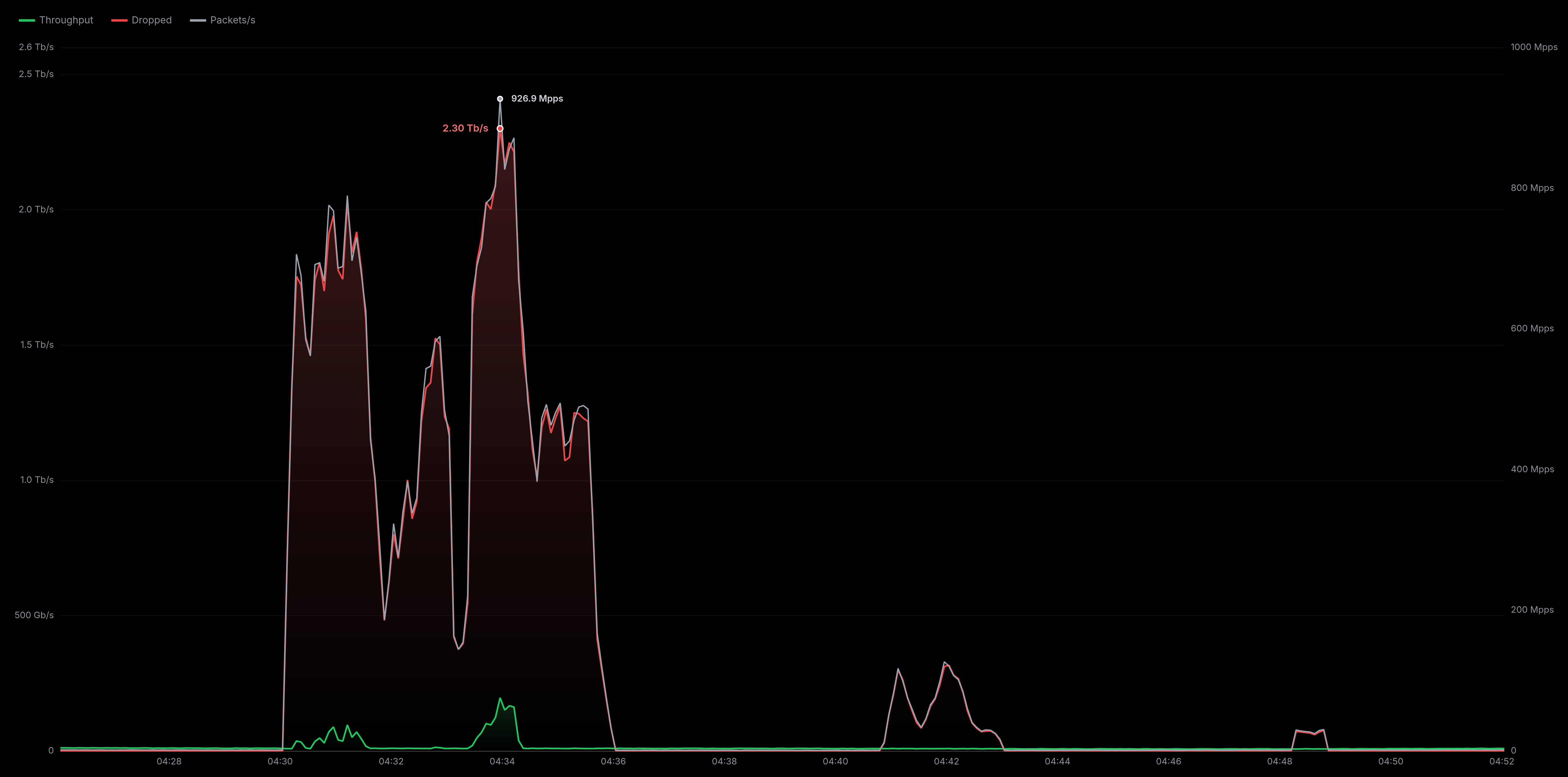 Attack mitigation in the 12Tbps range against our infrastructure
Connectivity partners and providers
- AMD
- Cisco
- Digital Realty
- Durand
- Intel
- IX.br
- Juniper
- NetIX







Your infrastructure needs to scale with your project
If your project grew and you need fully dedicated resources, VPS infrastructure may be limited. We offer exclusive Bare Metal servers with maximum performance for large apps and databases.

Operating systems
Choose from many supported options. You can switch OS at any time.
DebianUbuntuAlma Linux Rocky LinuxCentOSWindows Server
 FreeBSD
 OpenBSD
 Alpine Linux
 Proxmox VE
 Arch Linux
 Fedora
We also install custom systems (custom ISOs/OS). Please contact us before ordering for that.
Frequently asked questions (FAQ)
See the most common questions about our VPS with Coolify.
Coolify is an open-source self-hosted PaaS platform, an alternative to Heroku, Vercel, and Netlify. You deploy apps, databases, and Docker containers from Git, with SSL, webhooks, and monitoring, without cloud platform limits and pricing. On HypeHost VPS, Coolify comes pre-installed and you keep full root access.
Yes. Plans on this page are VPS servers with Coolify pre-installed on Ubuntu. You get a ready server to open the Coolify panel and start publishing apps in a few clicks.
You can deploy Node.js, Python, PHP apps, Docker containers, databases (PostgreSQL, MySQL, Redis, and more), static services, and dozens of one-click templates. The limit is plan resources (CPU, RAM, and disk), not the platform's project count.
Yes, if you want Git deployments and control of your own server. Coolify offers automatic deployments, domains, and SSL, while capacity depends on your VPS. Managed features from other platforms may need extra configuration; application updates, backups, and operations require planning.
Yes. Coolify makes deploys and management easier, but you keep full root access on Ubuntu to install packages, tune the firewall, Docker, and any advanced server configuration.
To start, the KVM 6GB plan works for light apps and a few services. For several projects, databases, and concurrent builds, we recommend KVM 12GB or higher. Coolify and containers share the VPS RAM and CPU.
Coolify documentation lists 2 CPU cores, 2 GB of RAM, and 10 GB of free disk space for the platform. Allow additional resources for Linux, builds, applications, databases, and volumes. The dashboard minimum does not represent the capacity your entire project needs.
The self-hosted version of Coolify is free and open source. You pay for the VPS that runs it. Coolify Cloud is a separate offering from the Coolify project; domains, external storage, and third-party services may have their own costs.
Yes. Point your domain or subdomain DNS to the VPS IP and configure the address in your application. With DNS and the required ports accessible, Coolify can issue and renew free Let's Encrypt certificates. Domain registration is purchased separately.
Configure persistent volumes and a backup routine for each database. For supported databases, Coolify lets you schedule copies and send them to S3-compatible storage. Back up user uploads too, and test restores. You need to configure your application backups.
Yes. Plan the transfer of repositories, environment variables, databases, and volumes to your new VPS. Validate applications before changing DNS, and keep an external copy of your data. For migration assistance, contact support to discuss feasibility and scope.
Yes, using a compatible service or Docker Compose. Allow RAM, CPU, and disk for n8n, its database, and your other applications. Capacity depends on automation frequency and complexity; configure persistence and backups before using it in production.
Initial installation provides the dashboard for deploying your projects. It does not include ongoing maintenance of code, databases, or integrations. Plan updates, security, and backups, and confirm any additional management needs with support.
Yes. All plans include AntiDDoS protection. In Coolify you configure free SSL certificates (Let's Encrypt) automatically for your domains and apps.
Yes. Coolify supports webhooks and Git repository integration for automatic deploy on every push. You can also publish Docker images and manage databases and extra services from the UI.
Connection speed varies by plan, with flexible traffic on this product line. Check the network listed for each configuration. Actual transfer speeds also depend on the route and destination.
We guarantee 99.7% uptime, with 24/7 monitoring and specialized technical support.
Our servers are located in Brazil (São Paulo), ensuring low latency and high connection quality for LATAM.
We accept PIX, bank transfer, credit/debit card, and boleto (Banco do Brasil).
Yes! You can cancel within 7 days after signup and get a full refund. To cancel, just open a ticket in our panel.
No. All servers are commitment-free and you can cancel anytime.
What is a Coolify VPS in Brazil?
HypeHost's Coolify VPS is a virtual server with SSD storage, AntiDDoS protection, and Coolify pre-installed. Coolify is an open-source self-hosted alternative to Heroku, Vercel, and Netlify: you deploy apps, databases, and Docker containers from Git, with SSL, webhooks, and monitoring, without artificial project or build limits.
Coolify VPS technical specs
- Software: Coolify pre-installed on Ubuntu
- Storage: SSD from 25 GB to 450 GB
- Memory: up to 96 GB DDR4 RAM
- Network: speed depends on your selected plan, with flexible traffic
- Protection: AntiDDoS included
- Virtualization: KVM with dedicated resources
- Access: full root + Coolify panel
- IP: dedicated IPv4 + IPv6
- Location: datacenters in Brazil (São Paulo)
- Guaranteed uptime: 99.7%
Available Coolify VPS plans
All plans include SSD and Coolify pre-installed. Check the configs:
- KVM 2GB - 2 GB RAM, 25 GB SSD, 1 vCPUs, 1 Gbps - R$ 39/month
- KVM 4GB - 4 GB RAM, 30 GB SSD, 2 vCPUs, 1 Gbps - R$ 59/month
- KVM 6GB - 6 GB RAM, 40 GB SSD, 3 vCPUs, 1 Gbps - R$ 89/month
- KVM 12GB - 12 GB RAM, 80 GB SSD, 5 vCPUs, 1 Gbps - R$ 159/month
- KVM 24GB - 24 GB RAM, 140 GB SSD, 8 vCPUs, 1 Gbps - R$ 289/month
- KVM 32GB - 32 GB RAM, 200 GB SSD, 12 vCPUs, 2.5 Gbps - R$ 379/month
- KVM 64GB - 64 GB RAM, 300 GB SSD, 24 vCPUs, 10 Gbps - R$ 739/month
- KVM 96GB - 96 GB RAM, 450 GB SSD, 36 vCPUs, 10 Gbps - R$ 1,079/month
Progressive discounts for quarterly (10%), semiannual (15%), and annual (30%) cycles. No lock-in and full refund within 7 days.
Coolify requirements: how much RAM, CPU, and storage do you need?
Coolify needs a Linux server with SSH access. The official baseline is 2 CPU cores, 2 GB of RAM, and 10 GB of free disk space for the platform. At HypeHost, the dashboard comes pre-installed on Ubuntu. That minimum covers the platform; applications and databases use additional resources.
When sizing your VPS, add up dashboard, operating system, application, and database usage. Building a project can use more memory than running it day to day. Leave disk space for Docker images, volumes, and logs, and keep spare capacity so a new release does not compete with running services for every available resource.
Check the official Coolify installation requirementsHow to choose a VPS plan for Coolify
Choose based on your service mix and deployment resource usage. These configurations are starting points for evaluation, not a promise of a fixed application count:
- KVM 2GB: 2 GB of RAM, 1 vCPUs, and 25 GB SSD. An initial option for lightweight APIs, websites, and project validation. Check available memory before adding a database or building the application on the VPS itself.
- KVM 4GB: 4 GB of RAM, 2 vCPUs, and 30 GB SSD. More room to combine an application, database, and background tasks. Worth evaluating for projects that need additional capacity during updates.
- KVM 6GB: 6 GB of RAM, 3 vCPUs, and 40 GB SSD. A configuration to evaluate for multiple services, client projects, and test environments. Set service resource limits to keep one project from consuming resources needed by the others.
Monitor RAM, CPU, and disk after your project goes live. Consider a larger plan when recurring usage or builds approach capacity. Moving the database or build process to another server can also help as your application grows.
What you can do with Coolify on a VPS
- Git deploy: publish apps on every push with webhooks and automatic builds
- Docker containers: run images and stacks with isolation and simplicity
- Databases: PostgreSQL, MySQL, Redis, and more in a few clicks
- Free SSL: Let's Encrypt certificates managed by Coolify
- Multiple projects: no per-app fee - the limit is plan hardware
- Monitoring: built-in tracking of services and resources
How to deploy an application with Coolify on your VPS
Once the dashboard is available, organize your project and configure its deployment. A first Git deployment follows these steps:
- Connect your code: create a project and select the repository and branch. Use the GitHub integration or a deploy key to grant access to private repositories, depending on your Git provider.
- Configure your application: choose a compatible build method or your Dockerfile, set the service port, and add environment variables. Keep production credentials separate from development values.
- Point your domain: configure DNS for the VPS IP and add the address in Coolify. Once the domain resolves correctly and network access is allowed, enable HTTPS to protect access.
- Deploy and validate: follow the logs and test routes and database connectivity. Then configure automatic Git-triggered deployments if needed, and confirm data persists after another deployment.
Node.js, Next.js, Laravel, and Docker Compose on one VPS
Coolify lets you deploy code from a repository, use a Dockerfile, or run a prebuilt Docker image. This works for projects such as Next.js, Nuxt, Laravel, and Django when the image, dependencies, and commands are compatible. You choose the runtime version and keep configuration with your project.
With Docker Compose, an application can combine an API, database, and supporting services. Configure volumes for data that needs to survive updates, and use internal networks for services that do not need public access. Tools such as n8n can also share the VPS within your resource capacity and each software license.
Databases, persistent volumes, and backups in Coolify
PostgreSQL, MySQL, and other databases need persistent storage. A new deployment can replace the container; data should live in volumes configured to persist. Keep user uploads separate from application code too, and avoid exposing the database port to the internet when only internal services need access.
For supported databases, configure scheduled backups in Coolify and send a copy to external S3-compatible storage. A database backup does not automatically cover application files or every Docker volume. Define retention and test a restore in a separate environment to verify that you can recover the service.
Coolify vs Heroku, Vercel, and Netlify
Coolify offers a Git deployment flow similar to platforms such as Heroku, Vercel, and Netlify, with services running on your VPS. The difference is in operations: you choose resources, configure databases and volumes, and handle updates. Platform-specific features may need adaptation; it is not an automatic replacement for every project.
The self-hosted version of Coolify is free and has no per-application license fee. Infrastructure costs depend on your VPS plan and any additional services you choose, such as a domain or external storage. When comparing prices, also consider maintenance time, the payment cycle total, and renewal terms.
How to migrate applications to a Coolify VPS in Brazil
Start with an inventory: repositories, versions, environment variables, databases, files, and scheduled tasks. Create services on the new VPS, restore a copy of your data, and test using a temporary address. Check authentication, email delivery, external integrations, and read and write permissions.
Plan a final data sync before changing DNS, especially for stores, systems accepting new records, and automations. Keep the previous environment and an external backup until the new setup is validated. If you need HypeHost assistance, discuss migration feasibility and scope with support before scheduling the move.
What to compare when choosing Coolify hosting
Compare the actual VPS location, RAM, CPU, disk, network speed, and support scope. Check whether Coolify comes installed, which backups you need to configure, and the total cost of each billing cycle. For projects serving Brazilian users, infrastructure in São Paulo is a relevant consideration; actual latency also depends on each user's connection and route.
Which apps is the Coolify VPS good for?
- SaaS and APIs: Node.js, Python, PHP backends and microservices
- Full-stack apps: Next.js, Nuxt, Laravel, Django, Rails, and similar
- Databases and queues: PostgreSQL, MySQL, Redis, workers, and jobs
- Staging environments: preview and production on the same server
- Agencies and freelancers: multiple clients and projects on one VPS
- Automation and internal tools: panels, light CRMs, and Docker integrations
Location and latency in Brazil
All servers are in datacenters in Brazil (São Paulo), offering low latency for users and APIs across Latin America. Ideal for digital products serving Brazilian audiences that need deploy close to end customers.
HypeHost guarantees and support
- 99.7% guaranteed uptime with 24/7 monitoring
- 7-day refund with no bureaucracy
- No lock-in - cancel whenever you want
- Human technical support via ticket and chat
- Automatic activation a few minutes after payment
- Coolify pre-installed so you can start publishing apps right away
Why choose HypeHost for Coolify VPS?
HypeHost combines SSD, AntiDDoS, and human support in Brazil with Coolify pre-installed for anyone who wants PaaS convenience without giving up VPS control. It is the solution for developers, startups, and agencies seeking easy deploy, predictable cost, and their own infrastructure - the real open-source alternative to Heroku and Vercel, hosted in São Paulo.
Other options for hosting your application
If you already know which service is your project's priority, explore these dedicated pages too:
- VPS for Docker and containers in Brazil
- VPS for hosting n8n automations
- VPS for Supabase and PostgreSQL databases
Payment methods
We accept credit cards (Visa, Mastercard, Elo, Amex), Pix with instant activation, PayPal, bank slip and bank transfer.
SWIFT subject to prior review. Contact us for details.
 Visa
 Mastercard
 Elo
 Amex
 Pix
 Mercado Pago