
Hyper-V VPS
Nested Virtualization to create VMs on your VPS
Ryzen VPS with Nested Virtualization enabled to install Hyper-V, run Windows labs and create VMs in Brazil. NVMe SSD, AntiDDoS and activation in minutes. Windows BYOL.
Nested Virtualization
Hyper-V ready
Windows BYOL
NVMe SSD
Hosted in Brazil
Who is this VPS for?
For people who need nested virtualization, not only a Windows box with RDP.
Infrastructure labs
Active Directory, GPO, virtual networks and Microsoft certification scenarios.
Windows dev and QA
Test environments with multiple builds, snapshots and isolation between projects.
MSPs and consultants
Validation, demos and POCs without filling local racks or desktops.
Sandboxes
Run software, scripts or builds in disposable guests, separate from the host.
Education and courses
Student labs and training with Hyper-V in the cloud.
Windows and Linux together
Guests of different OSes on the same VPS when the stack needs both.
VPS plans for Hyper-V and Nested Virtualization
Ryzen line with nested virt enabled. Pick a billing period and lab size.
For Hyper-V with 2 or more guests, start with Terra (8 GB) or higher.

Marte
R$ 99
/mo
4 GB RAM
60 GB NVMe SSD
2 vCPUs
Fixed IPv4 + IPv6
Root access
1 Gbps up/down
Unlimited traffic
Automatic backup





Vênus
R$ 159
/mo
6 GB RAM
80 GB NVMe SSD
3 vCPUs
Fixed IPv4 + IPv6
Root access
1 Gbps up/down
Unlimited traffic
Automatic backup

Terra
R$ 199
/mo
8 GB RAM
100 GB NVMe SSD
4 vCPUs
Fixed IPv4 + IPv6
Root access
1 Gbps up/down
Unlimited traffic
Automatic backup

Netuno
R$ 299
/mo
12 GB RAM
180 GB NVMe SSD
5 vCPUs
Fixed IPv4 + IPv6
Root access
1 Gbps up/down
Unlimited traffic
Automatic backup

Urano
R$ 359
/mo
16 GB RAM
200 GB NVMe SSD
6 vCPUs
Fixed IPv4 + IPv6
Root access
1 Gbps up/down
Unlimited traffic
Automatic backup

Saturno
R$ 549
/mo
24 GB RAM
260 GB NVMe SSD
8 vCPUs
Fixed IPv4 + IPv6
Root access
1 Gbps up/down
Unlimited traffic
Automatic backup

Júpiter
R$ 729
/mo
32 GB RAM
340 GB NVMe SSD
10 vCPUs
Fixed IPv4 + IPv6
Root access
1 Gbps up/down
Unlimited traffic
Automatic backup
Marte
R$ 99
/mo
4 GB RAM
60 GB NVMe SSD
2 vCPUs
Fixed IPv4 + IPv6
Root access
1 Gbps up/down
Unlimited traffic
Automatic backup
Vênus
R$ 159
/mo
6 GB RAM
80 GB NVMe SSD
3 vCPUs
Fixed IPv4 + IPv6
Root access
1 Gbps up/down
Unlimited traffic
Automatic backup
Terra
R$ 199
/mo
8 GB RAM
100 GB NVMe SSD
4 vCPUs
Fixed IPv4 + IPv6
Root access
1 Gbps up/down
Unlimited traffic
Automatic backup
Netuno
R$ 299
/mo
12 GB RAM
180 GB NVMe SSD
5 vCPUs
Fixed IPv4 + IPv6
Root access
1 Gbps up/down
Unlimited traffic
Automatic backup
Urano
R$ 359
/mo
16 GB RAM
200 GB NVMe SSD
6 vCPUs
Fixed IPv4 + IPv6
Root access
1 Gbps up/down
Unlimited traffic
Automatic backup
Saturno
R$ 549
/mo
24 GB RAM
260 GB NVMe SSD
8 vCPUs
Fixed IPv4 + IPv6
Root access
1 Gbps up/down
Unlimited traffic
Automatic backup
Júpiter
R$ 729
/mo
32 GB RAM
340 GB NVMe SSD
10 vCPUs
Fixed IPv4 + IPv6
Root access
1 Gbps up/down
Unlimited traffic
Automatic backup
Windows license and Hyper-V / virtualization setup support are not included. The environment is self-managed (BYOL).
Each VPS includes 1 IPv4. Extra IPs: R$ 15/month per address.
How much RAM do I need?
Reserve memory for the Windows host and each guest. Practical guide: 4 to 6 GB on the host and 2 to 4 GB per light VM. Labs with AD and 2 or 3 machines often need 12 to 16 GB. Windows instances usually use a lot of RAM when running a desktop.
How to run Hyper-V on your VPS
From order to first guest in a few steps.
Pick a plan
Prefer 8 GB of RAM or more if you will run several VMs. Windows instances usually use a lot of RAM when running a desktop.
Install Windows (BYOL)
Use your own Windows Server license or ISO. Administrator access over RDP in minutes. License is not included in the plan.
Enable Hyper-V
With Nested Virtualization enabled on the host, install the Hyper-V role and reboot. Then confirm the nested hypervisor started.
Create your VMs
Configure vSwitch, VHDX disks and guests. Use them for labs, staging, demos or app isolation.
Customers using nested virt at HypeHost
"Suporte muito prestativo, sempre resolveu meus problemas em menos de 30 minutos, uso essa hospedagem há um ano e pretendo continuar usando! Parabéns pelo trabalho."
Gabriel
Customer since 2022
"Ótimo atendimento, cumpre com o prometido, garante uma grande estabilidade no serviço. Nota 10"
João Vitor
Customer since 2025
"a meses sou cliente, um cliente satisfeito, quando precisei sempre foi humano, não é uma empresa dura na sua forma de lhe dar com o cliente, acho além da qualidade do serviço, especial demais a forma humanizada de lhe dar com cliente..."
Anderson
Customer since 2024
"Tive um problema de madrugada,(por volta das 3:00) mandei o tícket e as 7:00 ja estava resolvido meu problema"
Matheus
Customer since 2025
Nested virtualization used for Windows labs, Hyper-V and test environments in Brazil.
Why a VPS with Nested Virtualization for Hyper-V?
Many providers leave nested virtualization disabled. On these plans it comes enabled so you can install Hyper-V and create VMs without renting bare metal only for a lab.
Hyper-V on Windows Server
Install the Hyper-V role and manage VMs with Hyper-V Manager, PowerShell or Windows Admin Center.
Labs and isolated environments
Build AD, DNS, IIS, databases and study scenarios without mixing them into production or buying dedicated hardware.
Multiple VMs on one VPS
Create Windows and Linux guests on the host. Useful for tests, demos and project isolation.
Ryzen and NVMe SSD
Fast CPU, dedicated RAM and NVMe disk for VM boots, snapshots and virtual disk I/O.
São Paulo datacenter
Low latency in Brazil, AntiDDoS, dedicated IP and a network suited for RDP and remote access.
No lock-in
Upgrade when the lab grows. 7-day refund, activation in minutes and support in Brazil (VPS platform).
AntiDDoS protection
With our AntiDDoS, you no longer need to worry about DDoS attacks on your server. You focus on the project, we host it for you!
Click to learn more about our DDoS protectionUnlimited traffic link
Give your project room to grow with our unlimited bandwidth links, without limits for your project.*
*Subject to our Acceptable Use Policy.
High performance
Servers with intelligently allocated CPU cores that deliver top performance even for the heaviest applications.
AntiDDoS for any attack
Premium DDoS protections that mitigate virtually any known DDoS attack.
1Gbps unlimited uplink
All our plans include 1Gbps uplink with unlimited bandwidth.
High-performance processing
With Ryzen 7/9 CPUs, you get the processing power needed to run any application, single or multi-threaded.
Support
Our support team helps you via WhatsApp or ticket from 9 AM to 11 PM.
Infrastructure for nested virtualization
KVM with Nested Virtualization, network in São Paulo and NVMe SSD hardware for VM disks.
Protection against DDoS attacks
The best in Brazil.
High-capacity distributed network with Anycast and smart filtering. Optimized for games, business and critical applications.
+12 Tb/s
Global capacity
2.30 Tb/s
Largest attack mitigated in 2026
8+ PoPs
Scrubbing centers
<10ms
Average response time
Smart filtering
Detection via traffic asymmetry and behavior-based mitigation.
Distributed mitigation
Anycast steers malicious traffic to the nearest scrubbing centers.
Zero-downtime
Mitigation without outages and without noticeable ping impact.
Multi-purpose
Fits games, apps, business workloads and critical services.
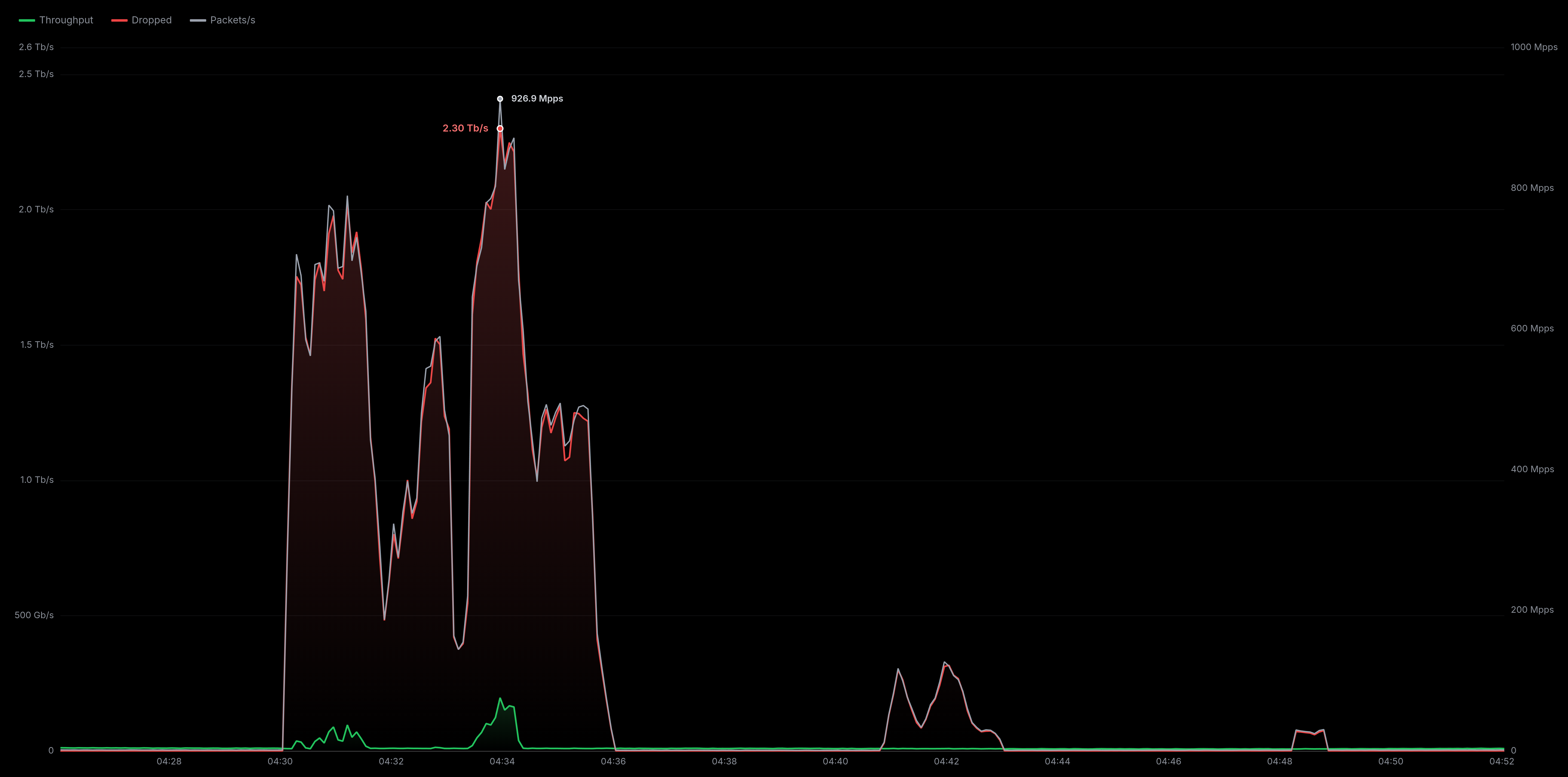 Attack mitigation in the 12Tbps range against our infrastructure
Connectivity partners and providers






'%3e%3cpath%20fill-rule='evenodd'%20clip-rule='evenodd'%20d='M164.184%2035.164L153.115%2018.4784L164.304%201.45228C164.401%201.30498%20164.409%201.11661%20164.326%200.960819C164.241%200.804317%20164.079%200.708008%20163.904%200.708008H157.714C157.554%200.708008%20157.401%200.789446%20157.314%200.923287L149.435%2013.8818L141.53%200.923287C141.44%200.789446%20141.289%200.708008%20141.129%200.708008H134.915C134.739%200.708008%20134.576%200.804317%20134.491%200.960819C134.408%201.11661%20134.417%201.30498%20134.514%201.45228L145.754%2018.4784L134.755%2035.2589C134.659%2035.4062%20134.65%2035.5952%20134.733%2035.7503C134.818%2035.9068%20134.98%2036.0031%20135.157%2036.0031H141.369C141.532%2036.0031%20141.682%2035.921%20141.771%2035.7864L149.435%2023.102L157.255%2035.7864C157.343%2035.921%20157.494%2036.0031%20157.656%2036.0031H163.845H163.86C164.129%2036.0031%20164.345%2035.7872%20164.345%2035.5223C164.345%2035.38%20164.282%2035.2525%20164.184%2035.164Z'%20fill='%233CC0C6'/%3e%3c/g%3e%3cmask%20id='mask1'%20mask-type='alpha'%20maskUnits='userSpaceOnUse'%20x='76'%20y='0'%20width='26'%20height='37'%3e%3cpath%20d='M76.6386%2036.1546H101.445V0.847656H76.6386V36.1546Z'%20fill='white'/%3e%3c/mask%3e%3cg%20mask='url(%23mask1)'%3e%3cpath%20fill-rule='evenodd'%20clip-rule='evenodd'%20d='M101.445%201.32849V6.53484C101.445%206.80182%20101.23%207.01497%20100.964%207.01497H92.1486V35.6747C92.1486%2035.9403%2091.934%2036.1548%2091.6685%2036.1548H86.414C86.1484%2036.1548%2085.9345%2035.9403%2085.9345%2035.6747V7.01497H77.118C76.8525%207.01497%2076.6386%206.80182%2076.6386%206.53484V1.32849C76.6386%201.06364%2076.8525%200.847656%2077.118%200.847656H100.964C101.23%200.847656%20101.445%201.06364%20101.445%201.32849Z'%20fill='%233CC0C6'/%3e%3c/g%3e%3cmask%20id='mask2'%20mask-type='alpha'%20maskUnits='userSpaceOnUse'%20x='41'%20y='0'%20width='24'%20height='37'%3e%3cpath%20d='M41.8472%2036.1544H64.795V0.851074H41.8472V36.1544Z'%20fill='white'/%3e%3c/mask%3e%3cg%20mask='url(%23mask2)'%3e%3cpath%20fill-rule='evenodd'%20clip-rule='evenodd'%20d='M64.3149%200.851074H42.3274C42.0632%200.851074%2041.8472%201.06565%2041.8472%201.3312V35.6746C41.8472%2035.9401%2042.0632%2036.1547%2042.3274%2036.1547H64.3149C64.579%2036.1547%2064.795%2035.9401%2064.795%2035.6746V30.4675C64.795%2030.2027%2064.579%2029.9881%2064.3149%2029.9881H48.0146V23.1941H60.4795C60.7451%2023.1941%2060.961%2022.9802%2060.961%2022.7132V17.509C60.961%2017.242%2060.7451%2017.0289%2060.4795%2017.0289H48.0146V7.09204H64.3149C64.579%207.09204%2064.795%206.87818%2064.795%206.6112V1.3312C64.795%201.06565%2064.579%200.851074%2064.3149%200.851074Z'%20fill='%233CC0C6'/%3e%3c/g%3e%3cpath%20fill-rule='evenodd'%20clip-rule='evenodd'%20d='M28.1146%200.847656H23.0024C22.7368%200.847656%2022.523%201.06364%2022.523%201.32849V21.0265L0.806002%200.975832C0.666495%200.847656%200.463255%200.812249%200.289049%200.889437C0.113427%200.96521%200.00012207%201.138%200.00012207%201.32849V35.6747C0.00012207%2035.9403%200.216109%2036.1541%200.481667%2036.1541H5.6165C5.88347%2036.1541%206.09662%2035.9403%206.09662%2035.6747V15.5964L27.7867%2036.0238C27.8766%2036.1102%2027.9956%2036.1541%2028.1146%2036.1541C28.1797%2036.1541%2028.2449%2036.1421%2028.3065%2036.1152C28.4828%2036.0394%2028.5961%2035.8659%2028.5961%2035.6747V1.32849C28.5961%201.06364%2028.3815%200.847656%2028.1146%200.847656Z'%20fill='%233CC0C6'/%3e%3cmask%20id='mask3'%20mask-type='alpha'%20maskUnits='userSpaceOnUse'%20x='113'%20y='0'%20width='7'%20height='37'%3e%3cpath%20d='M113.342%2036.1545H119.471V0.708008H113.342V36.1545Z'%20fill='white'/%3e%3c/mask%3e%3cg%20mask='url(%23mask3)'%3e%3cpath%20fill-rule='evenodd'%20clip-rule='evenodd'%20d='M118.989%200.708008H113.822C113.556%200.708008%20113.342%200.923995%20113.342%201.18814V29.4272C114.031%2030.0242%20114.568%2030.8145%20114.791%2031.8229C115.258%2033.9318%20114.58%2035.3176%20113.852%2036.1547H118.989C119.255%2036.1547%20119.471%2035.9401%20119.471%2035.6746V1.18814C119.471%200.923995%20119.255%200.708008%20118.989%200.708008Z'%20fill='%233CC0C6'/%3e%3c/g%3e%3cpath%20fill-rule='evenodd'%20clip-rule='evenodd'%20d='M113.514%2032.4006C113.514%2034.4507%20111.852%2036.1142%20109.803%2036.1142C107.754%2036.1142%20106.091%2034.4507%20106.091%2032.4006C106.091%2030.3533%20107.754%2028.6885%20109.803%2028.6885C111.852%2028.6885%20113.514%2030.3533%20113.514%2032.4006Z'%20fill='%2300A09D'/%3e%3c/svg%3e)
Operating systems
Choose from many supported options. You can switch OS at any time.
DebianUbuntuAlma Linux Rocky LinuxCentOSWindows Server
 FreeBSD
 OpenBSD
 Alpine Linux
 Proxmox VE
 Arch Linux
 Fedora
We also install custom systems (custom ISOs/OS). Please contact us before ordering for that.
Your infrastructure needs to scale with your project
If your project grew and you need fully dedicated resources, VPS infrastructure may be limited. We offer exclusive Bare Metal servers with maximum performance for large apps and databases.

Frequently asked questions (FAQ)
See the most common questions about our Hyper-V VPS and Nested Virtualization.
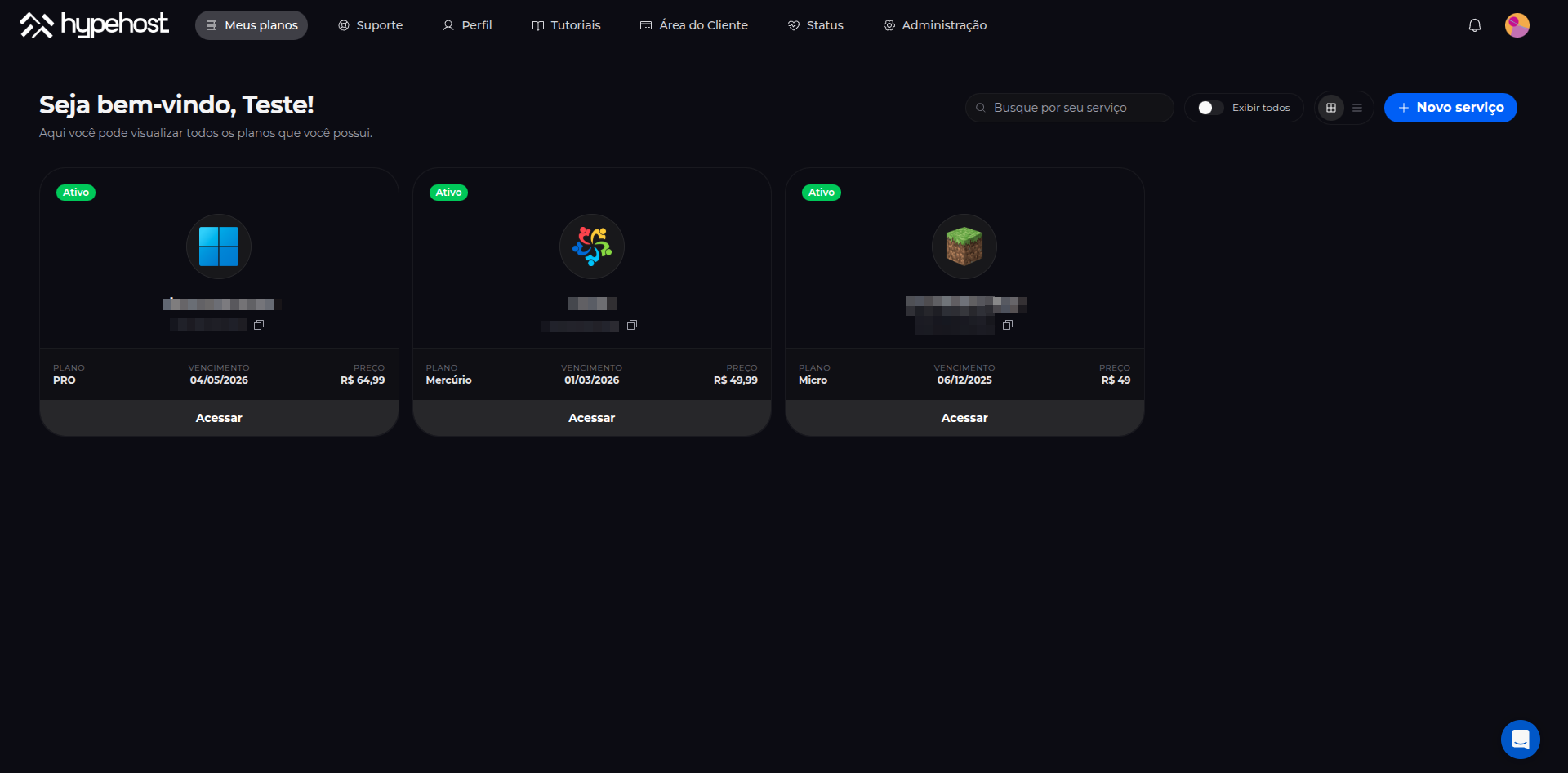
Our own control panel, built for simplicity
We built our own panel so you don't depend on generic tools. Everything that matters day to day - network, OS, metrics and recovery - lives in one place, with a fast interface designed for real operations.
Recovery tools
Reinstall the OS or run firewall reset commands in 2 clicks.
+10 operating systems
Ubuntu, Debian, Rocky, Alma, Windows Server, FreeBSD, OpenBSD and more. Switch OS whenever you need.
Real-time metrics
CPU, RAM, disk and network of your server live, with history up to 1 year.
Built-in firewall
Create and edit firewall rules from the panel. Open ports, block IPs and protect the server easily.
Backups
Schedule automatic backups and restore the full server when something goes wrong.
What is a VPS with Nested Virtualization for Hyper-V?
A VPS with Nested Virtualization is a private virtual server where the provider hypervisor (KVM at HypeHost) exposes hardware virtualization extensions to the guest operating system. In practice, your Windows Server or Linux sees VT-x/AMD-V support (and related features) and can install a second hypervisor on top, such as Microsoft Hyper-V.
That is nested virtualization: the customer VM becomes a virtualization host. You create internal VMs (guests) with virtual disks (VHDX), virtual switches, snapshots and network isolation, without renting bare metal only to build a lab.
On most commercial VPS products nested virtualization is disabled by default. Without it, Hyper-V installation fails, Hyper-V Manager cannot start the hypervisor, or internal VMs do not boot. On the plans on this page Nested Virtualization comes enabled, aimed at people who need Hyper-V in Brazil.
HypeHost Hyper-V VPS uses the Ryzen line with NVMe SSD, 1 dedicated IPv4 (extra IPs at R$ 15/month), AntiDDoS, a São Paulo datacenter and activation in minutes. Windows is BYOL: host and guest licenses are not included. Support for Hyper-V or virtualization configuration is also not included; support covers hardware, network and the VPS platform.
This format fits Active Directory labs, DNS, DHCP, IIS, study SQL Server, software staging, multi-build QA, customer demos, courses and sandboxes. For dozens of production VMs at high density, Bare Metal or a dedicated cluster is the usual path, where nested overhead is no longer desirable.
How Nested Virtualization works on a VPS
In the classic model, the datacenter hypervisor (level 0) runs your VM (level 1). With nested virt, the level-1 VM acts as a hypervisor and runs level-2 VMs (guests). On Windows Server that is the Hyper-V role; on Linux it may be KVM/QEMU when modules and CPU flags are available.
For Hyper-V to work nested, the physical host must expose virtualization instructions to the customer VM. On KVM this involves host configuration (for example host-passthrough CPU mode or equivalent flags) and security policies that allow nested. At HypeHost that capability is already enabled on this product line.
There is overhead: Windows host CPU and memory are shared with guests, and there is an extra virtualization layer. RAM and vCPU sizing matters more than on a VPS used for a single OS. NVMe storage helps multi-VM boots and VHDX I/O.
Hyper-V on Windows Server: what you can do
With the Hyper-V role installed, admins create and manage Generation 1 or 2 virtual machines, VHD/VHDX disks, checkpoints, external/internal/private virtual switches, and integrate with PowerShell (Hyper-V module) and Windows Admin Center.
Typical VPS scenarios: lab domain controllers, test file servers, IIS, Windows build agents, Linux VMs for APIs or databases, isolated networks to simulate client and server, and disposable environments to validate installers.
Limitations to keep in mind: nested virt does not replace a production Hyper-V cluster; GPU passthrough and some SR-IOV scenarios are usually restricted on VPS; performance depends on plan (vCPU, RAM and disk). Microsoft licensing (host and guests) is the customer's responsibility (BYOL).
Requirements and sizing practices
Before you buy, match the plan to guest count and Windows type:
- Windows Server host: reserve 4 to 6 GB for the OS and base services, more if you use a full GUI.
- Light guest (Server Core, utility, small lab): 2 to 4 GB per VM is a common starting point.
- Guest with desktop or multiple roles (AD + DNS + services): 4 GB or more per machine.
- Terra (8 GB) is usually the comfortable minimum for Hyper-V with 1 or 2 light guests.
- Labs with AD and 2 or 3 VMs: prefer 12 to 16 GB (Netuno/Urano) or higher.
- NVMe space: add ISO, VHDX, checkpoints and swap; 100 GB fills quickly with large VHDX files.
- Windows instances usually use a lot of RAM when running a desktop; Server Core or no GUI saves memory.
There is no single formula: watch Task Manager and Hyper-V Manager and upgrade if committed memory stays near the limit.
Technical specs of the offer
- AMD Ryzen processors (HypeHost high-frequency line)
- NVMe SSD for system and virtual disks (VHDX)
- Network in Brazil with low latency from São Paulo
- AntiDDoS included on plans
- KVM with Nested Virtualization enabled (Hyper-V ready)
- Windows BYOL - license not included; customer ISO or image
- 1 dedicated IPv4 + IPv6; extra IPs R$ 15/month per address
- Datacenter in São Paulo, Brazil
- 99.9% infrastructure uptime and automatic activation
- Support for hardware, network and VPS platform - no Hyper-V config support
- No lock-in; refund within 7 days; discounts on longer terms
Available plans for labs and Hyper-V
All plans below are on the Ryzen line with nested virt. Choose by RAM and disk for your VM count:
- Marte - 2 vCPU, 4 GB RAM, 60 GB NVMe - minimal lab or one-off tests
- Vênus - 3 vCPU, 6 GB RAM, 80 GB NVMe - lean Windows host
- Terra - 4 vCPU, 8 GB RAM, 100 GB NVMe - recommended start with Hyper-V and 1-2 light guests
- Netuno - 5 vCPU, 12 GB RAM, 180 GB NVMe - lab with AD and more than one VM
- Urano - 6 vCPU, 16 GB RAM, 200 GB NVMe - several guests or heavier services
- Saturno - 8 vCPU, 24 GB RAM, 260 GB NVMe - demos and QA with more isolation
- Júpiter - 10 vCPU, 32 GB RAM, 340 GB NVMe - denser labs in nested form
Discounts on quarterly, semiannual and annual billing. No lock-in and a 7-day refund. Upgrade available when the lab grows.
Windows licensing and customer responsibility
HypeHost does not include Microsoft Windows Server licenses or CALs. The model is BYOL (Bring Your Own License): you install Windows with your media and activate with your key under your Microsoft agreement.
The same applies to Windows guests inside Hyper-V: each guest OS needs proper licensing. Linux guests follow their distribution licenses.
Support for installing the Hyper-V role, creating vSwitches, nested virt troubleshooting, Active Directory or any in-guest software is also not included. HypeHost technical support covers hardware, network, AntiDDoS and VPS resources (access, reinstall, plan upgrades).
Network, IP and AntiDDoS
Each VPS includes 1 dedicated IPv4 and IPv6. Extra IPv4 addresses cost R$ 15 per month per address, useful when guests or services need their own public IP (always within acceptable use and what the platform allows).
AntiDDoS protection is included to mitigate common volumetric attacks on the Brazilian internet. It does not replace Windows Firewall, Hyper-V rules or admin hardening.
Latency from São Paulo favors RDP, Windows Admin Center and Hyper-V Manager from Brazil and much of Latin America.
Hyper-V VPS and nested virt use cases
- Active Directory, GPO, DNS, DHCP and Microsoft certification labs
- QA and staging with multiple Windows and Linux builds in separate guests
- POC and demos for MSP or consulting customers without local hardware
- Sandbox for installers, scripts and software in a disposable guest
- Classes and courses with remote Hyper-V labs
- Isolation per project or customer in light multi-tenant setups
- Windows development with dependencies in helper VMs
- Migration, backup and restore simulation in a controlled scenario
Hyper-V VPS, Windows VPS and Bare Metal
Windows VPS (RDP): when you need a single Windows with remote access and apps on the OS, without internal VMs.
Hyper-V VPS (this page): high-performance VPS hardware with Nested Virtualization enabled to install Hyper-V and run guests. Built for labs, QA and demos.
Bare Metal: exclusive physical hardware. Better when VM density, predictability and avoiding nested overhead matter more.
Limitations and realistic expectations
- Performance overhead versus Hyper-V on bare metal.
- Advanced features (GPU, some network offloads) may be unavailable on VPS.
- Virtualization license and support are not included.
- Network abuse, spam or ToS violations follow HypeHost general rules.
- Undersized RAM is the most common cause of a slow lab or a guest that will not start.
Location: São Paulo, Brazil
Servers are in São Paulo with connectivity aimed at national traffic. RDP, panels and Hyper-V management benefit from low latency from SP, RJ, MG, the South and other Brazilian regions.
Commercial terms and operations
- 99.9% infrastructure uptime
- Refund within 7 days
- No lock-in or cancellation fee
- Support via chat, WhatsApp and ticket (VPS platform)
- Automatic activation in minutes
- Nested Virtualization enabled for Hyper-V and labs
- Windows and guests under BYOL
- Extra IP at R$ 15/month per address
Why HypeHost for Hyper-V on a VPS?
Because Nested Virtualization comes enabled, hardware is Ryzen with NVMe, the datacenter is in Brazil, and license and support rules are clear: you manage Hyper-V, we run the VPS platform. No lock-in, 7-day refund and plan upgrades when the lab needs more RAM or disk.
Payment methods
We accept credit cards (Visa, Mastercard, Elo, Amex), Pix with instant activation, PayPal, bank slip and bank transfer.
SWIFT subject to prior review. Contact us for details.
 Visa
Visa Mastercard
 Elo
Elo Amex
Amex Pix
Pix Mercado Pago